
UAENMessage us on Telegram

Properlyfor residential developers

More than a CRM

One workspace for a developer's entire commercial team

MarketingSalesAfter-salesManagement

01Solution

Marketing, sales, money — one system

Before · six tools

  • Every tool — a separate implementation, payment and team training
  • Data is moved by hand — or through integrations that keep breaking
  • The numbers don't add up — the CRM says one thing, the spreadsheet another

After · Properly

  • All in one — one implementation, one update, one database
  • Works as one — data is entered once, and every team sees it
  • Done properly — the system adapts to your process

02Four teams

One workspace for the entire commercial team

Each team has its own modules, but the database is shared: clients, units, prices, contracts and payments. A client moves from team to team, and nothing gets lost.

Marketing · Marketing management

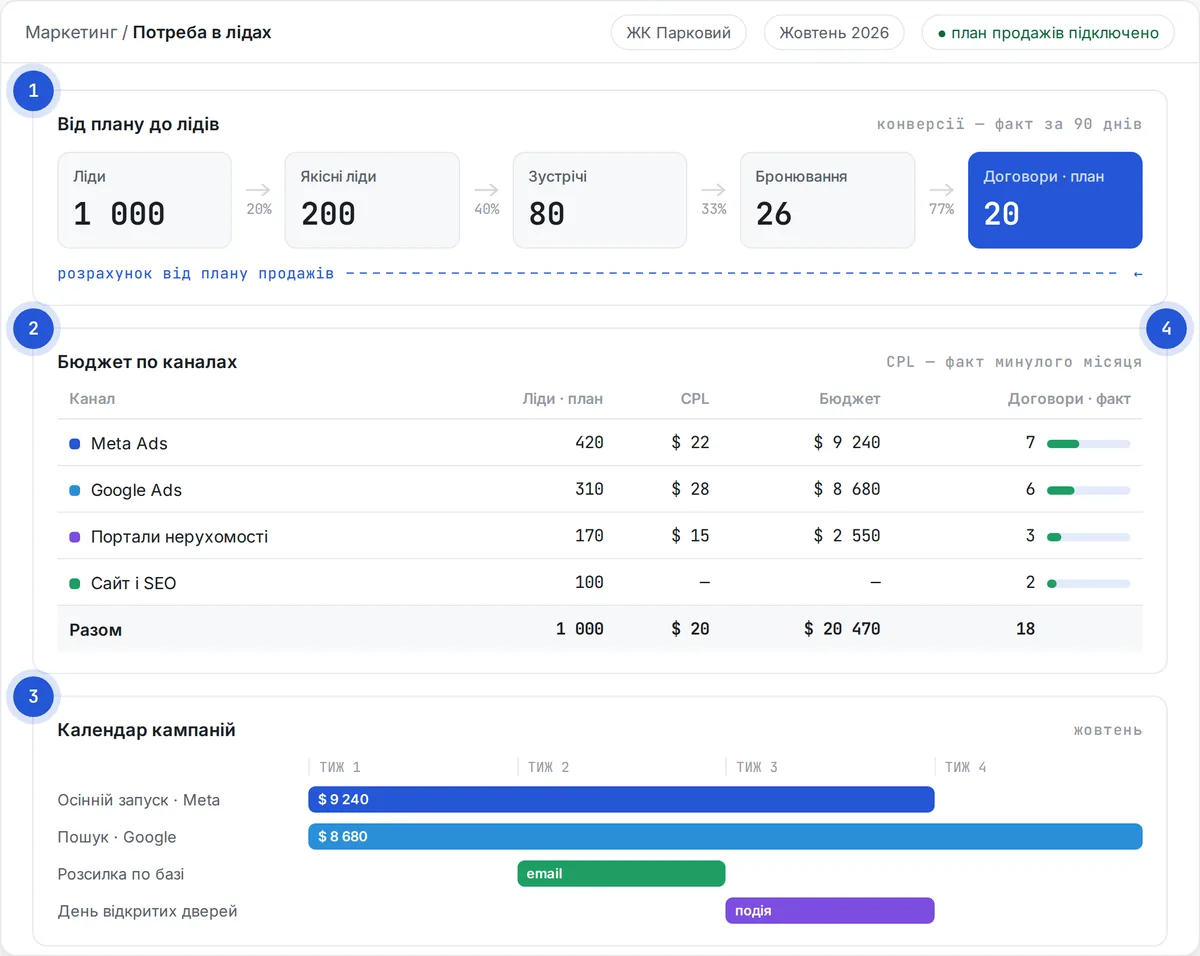
How many leads the plan needs — the system works it out

Instead of juggling spreadsheets, the marketer works out lead requirements from the sales funnel, builds the budget and plans ad campaigns in one place.

  1. Lead requirements — from the sales plan and your funnel conversion rates
  2. Budget by channel — what the plan costs and where to invest
  3. Campaign calendar — every launch on one timeline
  4. Sources to contract — leads, qualified leads and contracts for each channel
set up during implementation
“Marketing / Lead requirements” screen: funnel from plan to leads, budget by channel and campaign calendar

Sales · CRM

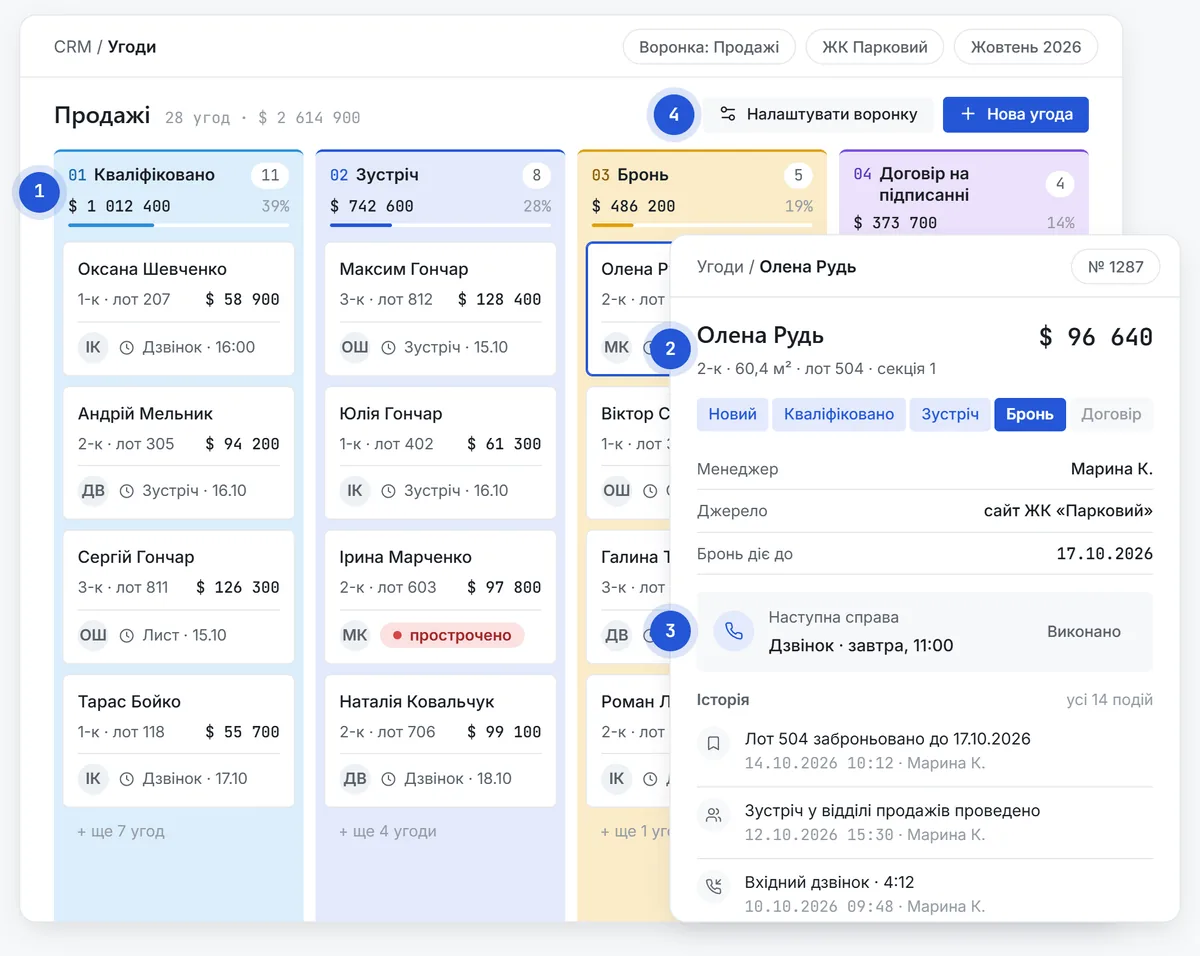
A CRM for real estate sales, already set up

Pipelines, stages, fields and cards come set up for selling real estate. And the CRM can be tailored to your specifics and business needs down to the last detail.

  1. Ready-made processes — real estate sales pipelines and stages from day one
  2. Leads, deals, contacts — with full history and boards by stage
  3. Next step — tasks, reminders and response deadlines
  4. Your process — pipelines, fields, cards and access in the admin settings
Deal board with ready-made real estate sales stages and a deal card with its event feed

Sales · Communications

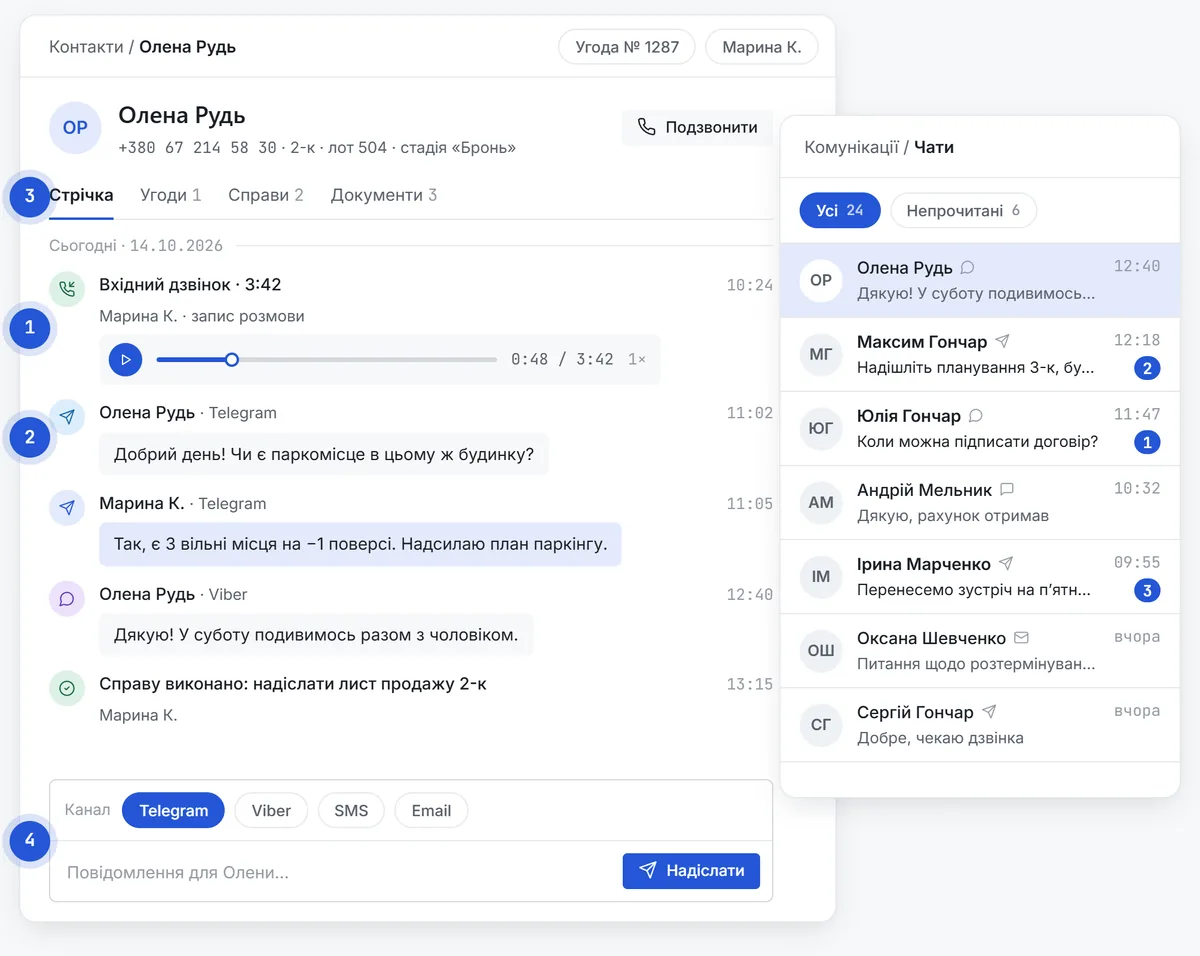
Every call and every message in the client card

Client conversations no longer get lost in managers' personal phones and messengers. We connect your telephony and messengers.

  1. Telephony — calls with recordings right in the card
  2. Messengers — Telegram, Viber, WhatsApp in the card and in a shared inbox
  3. One feed — calls, chats, tasks and changes in one place
  4. Reply from the card — the manager messages the client without leaving the system
set up during implementation
Client card with its feed: a recorded call, Telegram and Viber messages, reply field

Sales · Calculator & sales sheet

Instalment plan and commercial offer in a minute

replaces: Excel calculatorOffers in PowerPoint

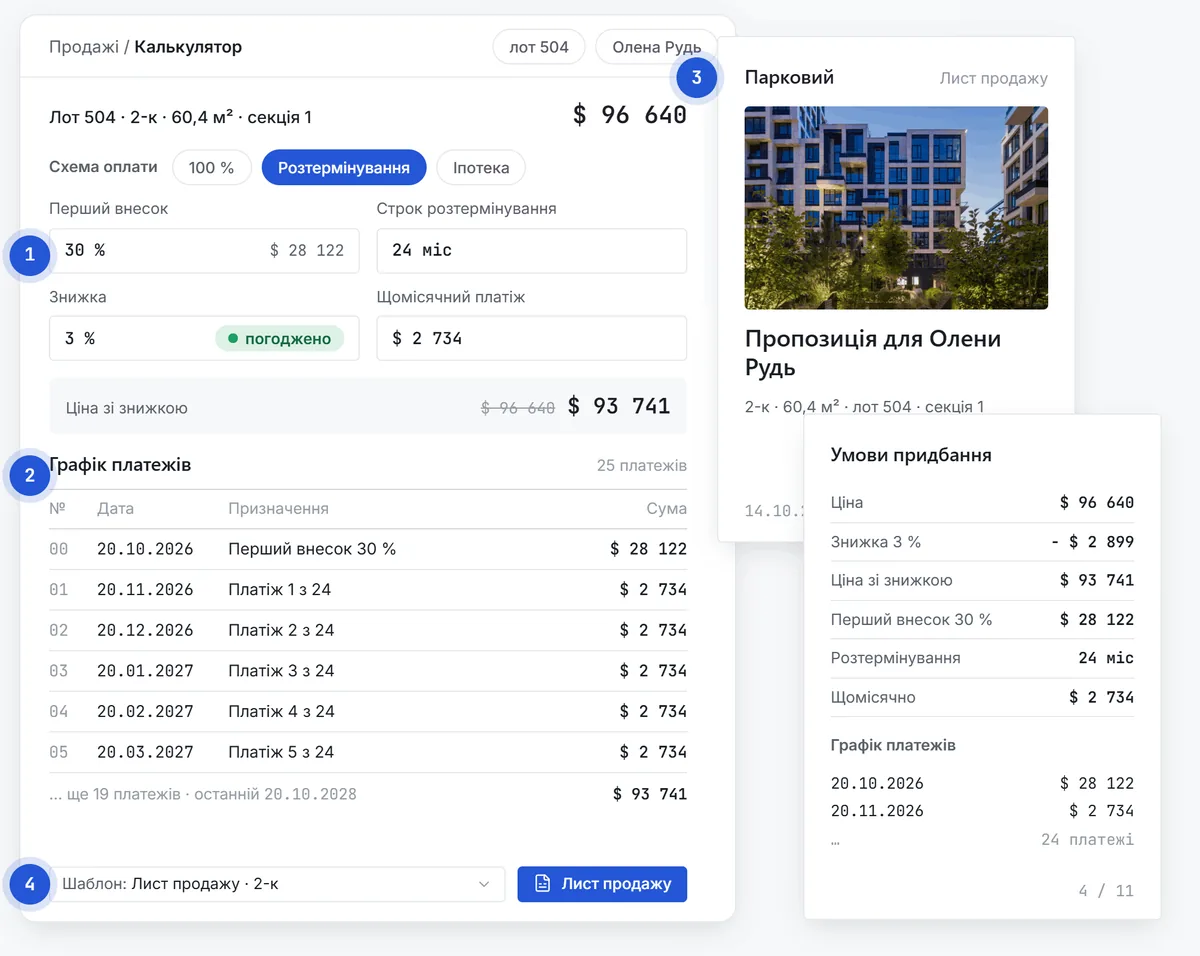
The manager works out the terms together with the client and sends a finished offer straight away.

  1. Payment options — instalments, discounts, down payment
  2. Payment schedule — calculated automatically
  3. PDF sales sheet — floor plan, terms and schedule in your style
  4. Templates — content and layout set by the administrator
Instalment calculator with a payment schedule and two pages of a sales sheet

After-sales · Contracts & documents

From deal to contract without retyping

replaces: contracts in Word

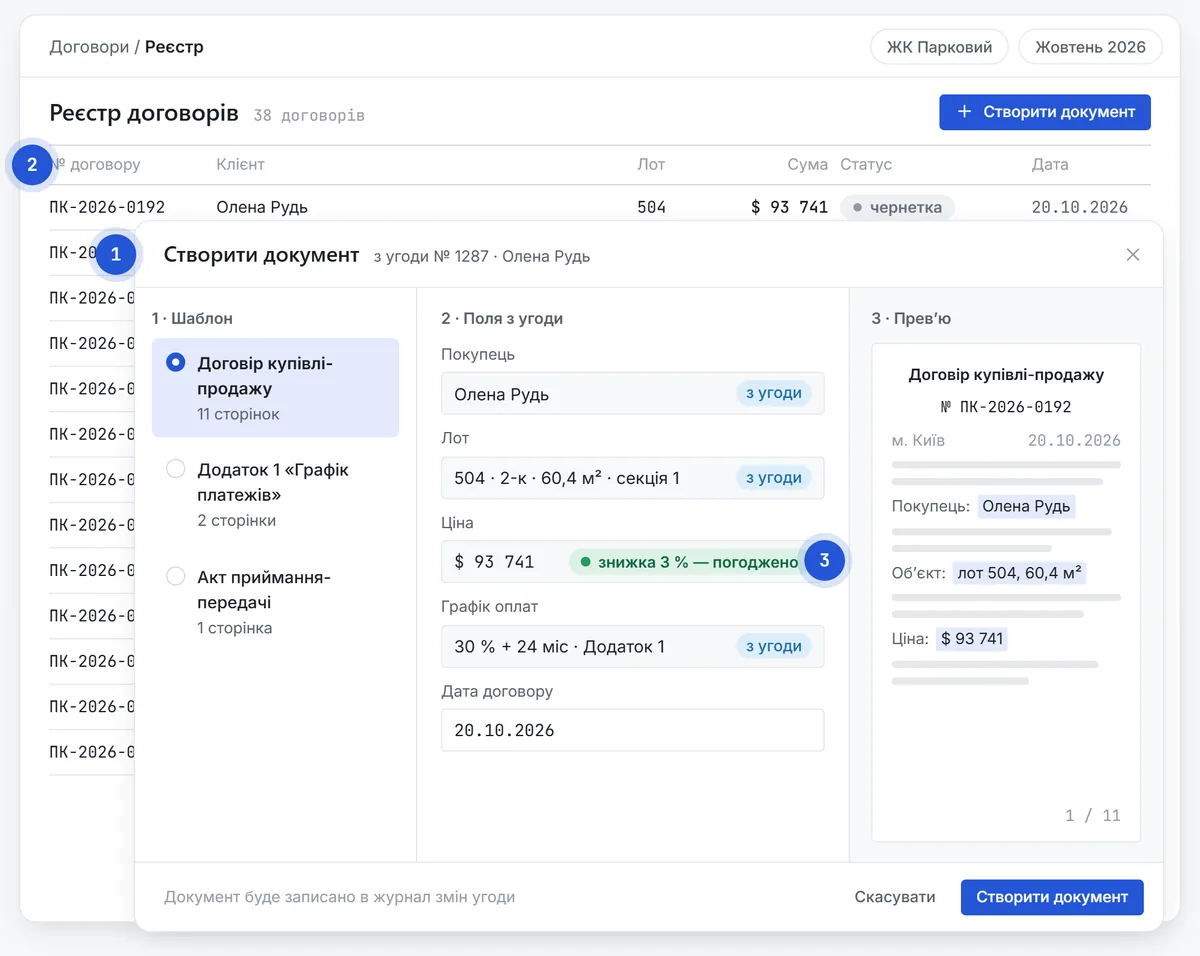
Client, unit and calculation data fill in the template, and the contract is ready in minutes.

  1. Document generator — contracts and annexes from your templates
  2. Contract register — statuses, parties, documents
  3. Approvals — discounts and non-standard terms follow an approval route
“Create document” dialog with fields from the deal, and the contract register

After-sales · Payments & receivables

Every payment on its contract, every debt in plain sight

replaces: payment and debtor spreadsheets

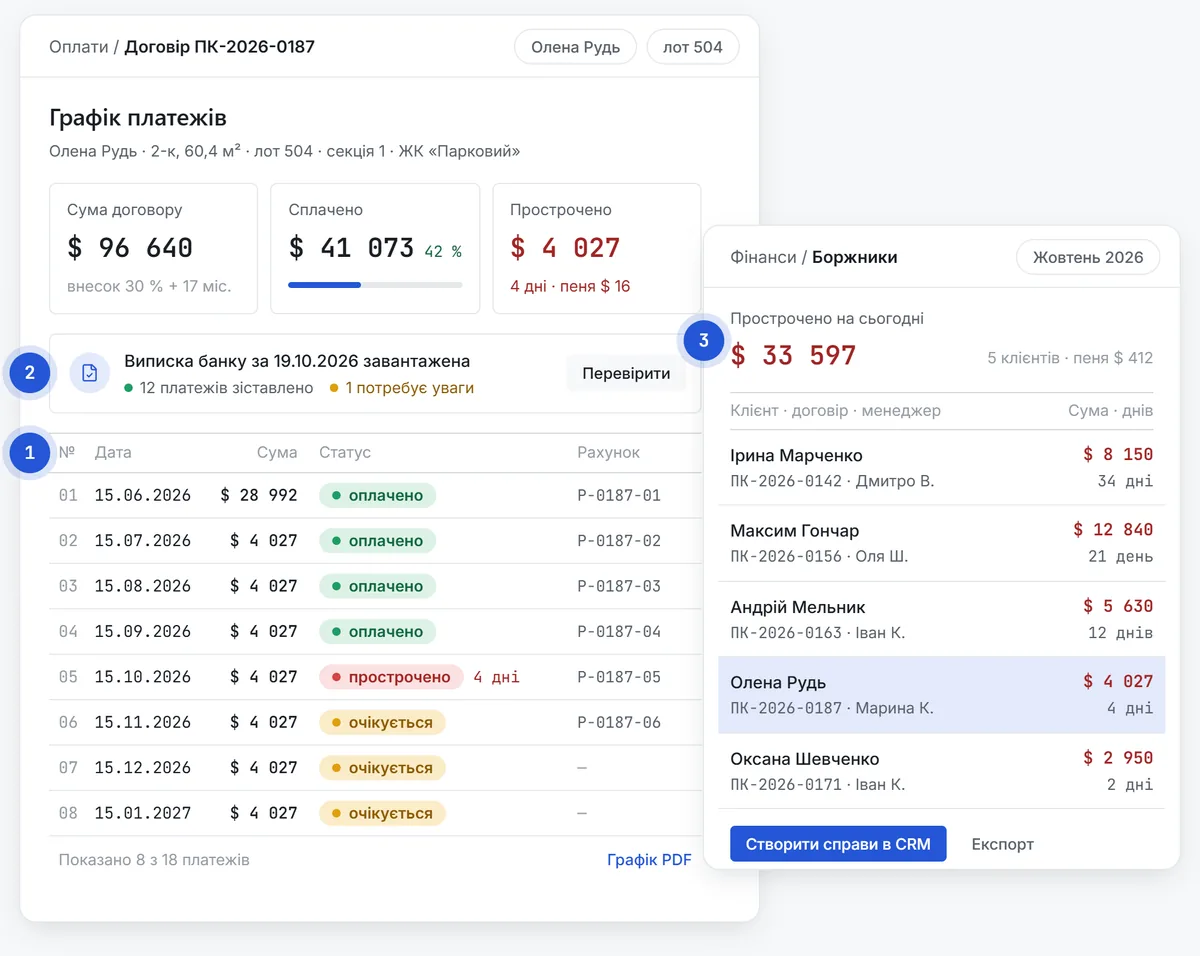
After-sales and finance see who has to pay, how much and when, and who is already overdue.

  1. Payment schedules and invoices — for every contract
  2. Bank statement — uploaded and matched to contracts
  3. Debtors — amounts and days overdue for each client
Contract payment schedule with statuses, and a debtor list with amounts and days overdue

After-sales · Buyer portal

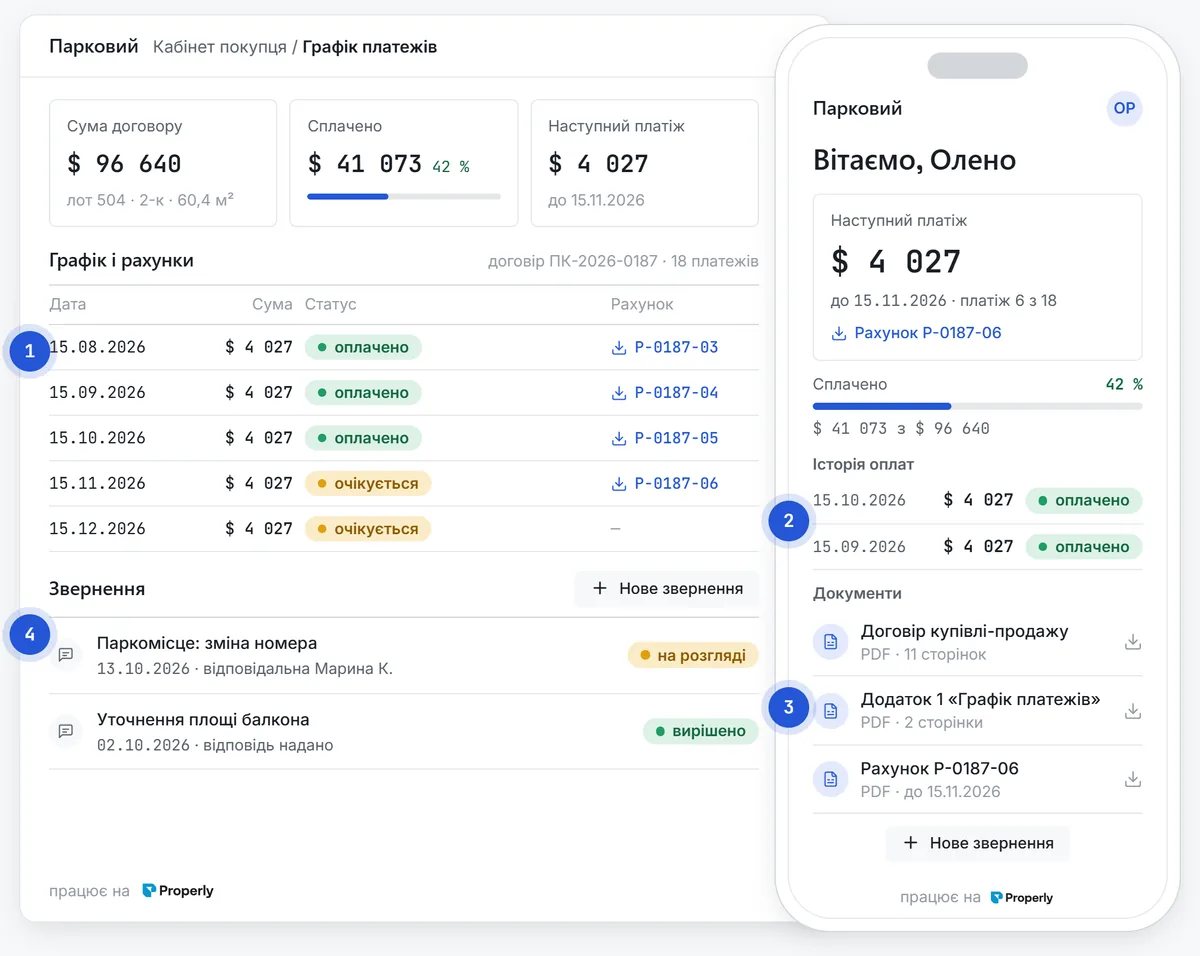
Buyers see their schedule, payments and documents themselves

A personal portal under your brand: fewer “how much do I owe and when” calls, and more trust in the developer.

  1. Schedule and invoices — the next payment and its amount on the first screen
  2. Payment history — what has been received and when
  3. Documents — the contract and annexes always at hand
  4. Requests — questions to after-sales without calls or emails
set up during implementation
Buyer portal on phone and desktop: next payment, payment history, documents

Management · Sales planning

A sales plan you can check against every day

replaces: Excel sales plans

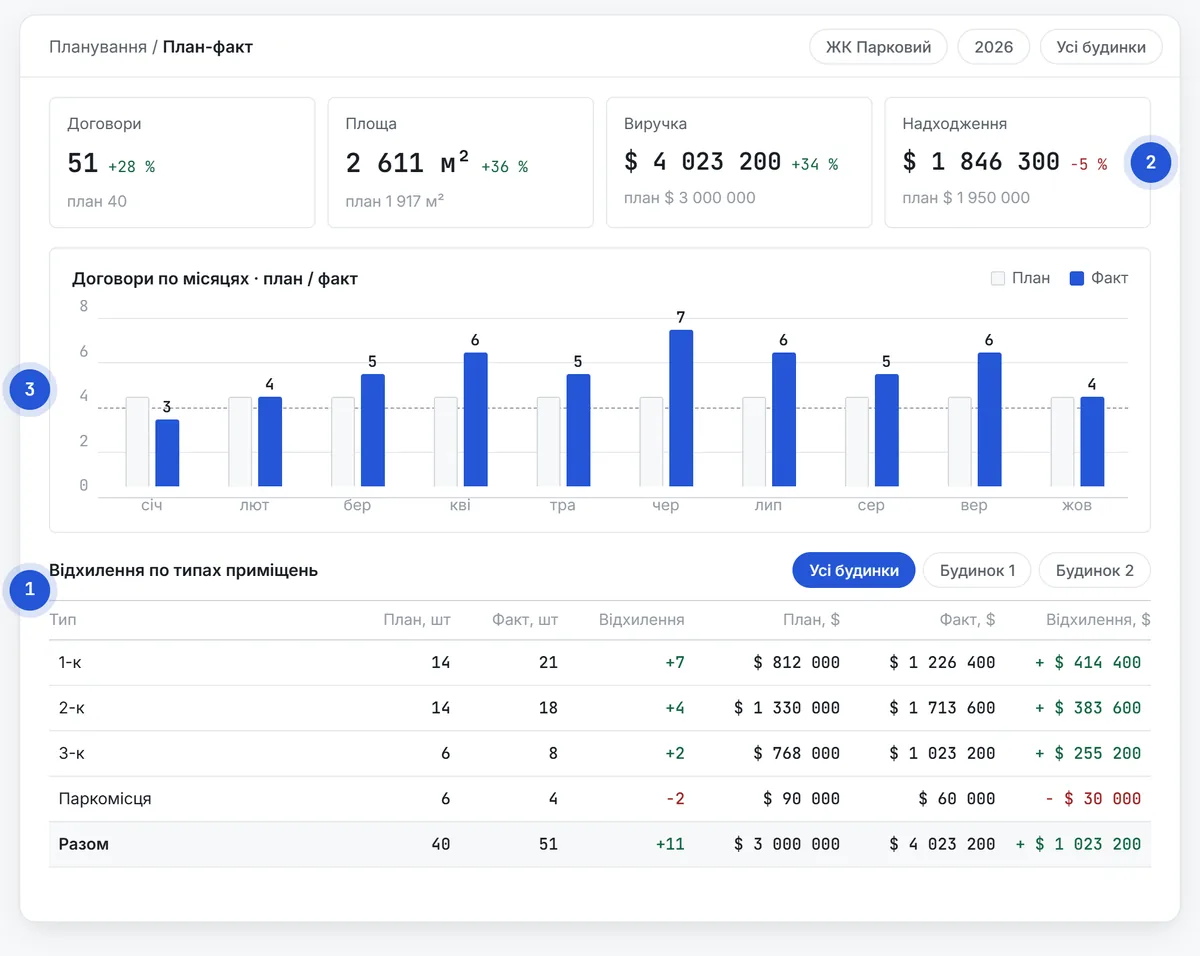
The plan by building and unit type lives in the system and is compared with actuals every day.

  1. Plan by building and type — pace, area, price, revenue
  2. Cash inflow — from payment schedules
  3. Plan vs actual — deviations are visible at once
Sales planning: plan vs actual figures, monthly chart and deviation table

Management · Pricing & inventory

Prices keep up with demand

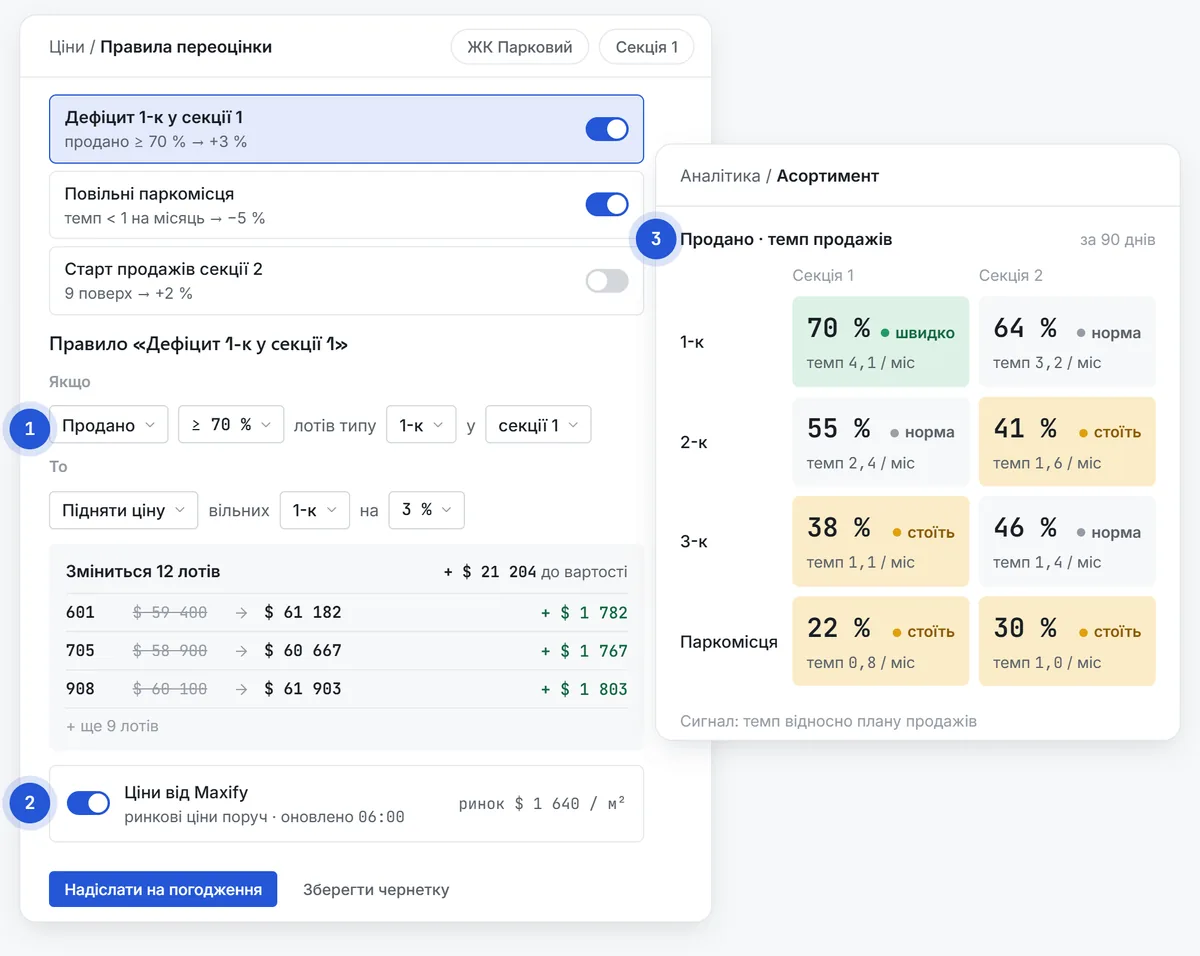
Prices change by rules and data, not once a quarter at a meeting.

  1. “Condition → action” rules — e.g. 70% of one-bedroom units sold: price +3%
  2. Maxify — dynamic pricing by M4U
  3. Inventory analytics — what sells and what sits

Maxify results in M4U projects

over 4%revenue growth20%shorter deal cycle25%smaller buyer discounts
source: m4u.ua
Pricing rule editor and an inventory heat map by unit type

Management · Analytics & reports

Where the plan stands and where the problem is, every day

replaces: BI for reports

Reports build themselves from live data, with no analyst and no manual consolidation.

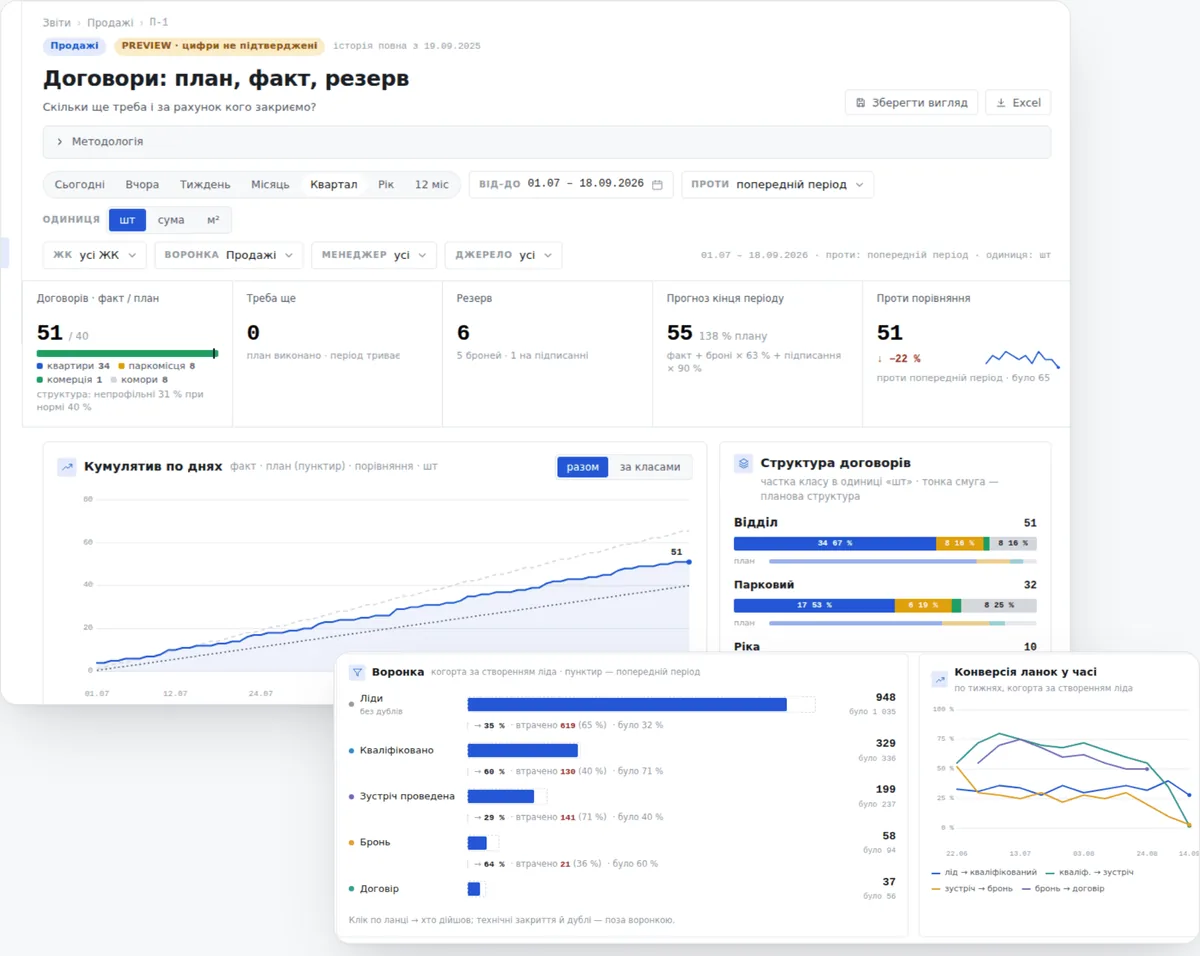
  1. Contracts — plan, actual and reserve
  2. Funnel — conversion rates and loss reasons
  3. Managers and sources — who and what brings results
  4. Daily dashboard — and export to Excel
“Contracts: plan, actual, reserve” report and a funnel with conversion rates

Management · Incentives

Managers see their incentives every day

replaces: bonus sheets in Excel

Finance no longer calculates bonuses in Excel: the system does it by your rules.

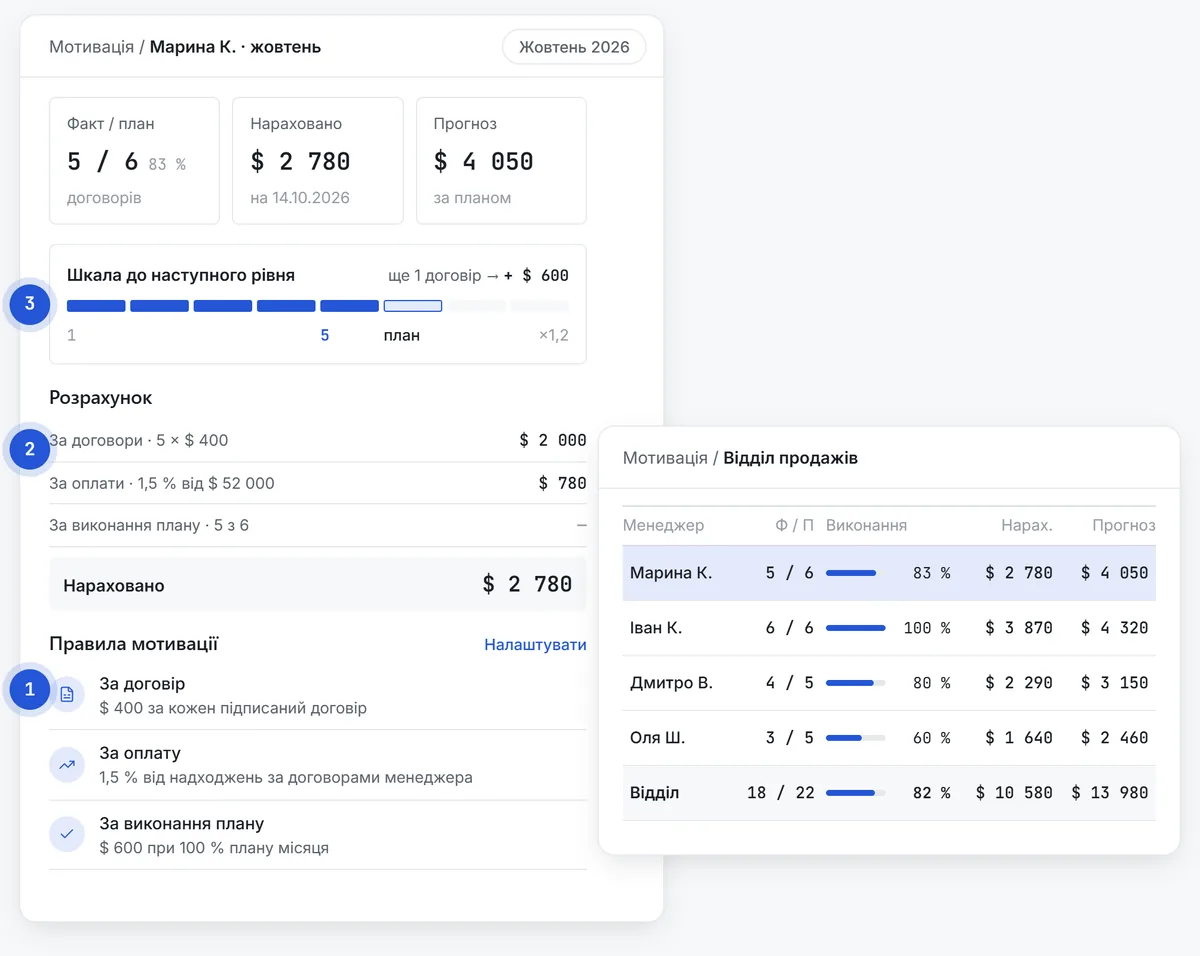
  1. Rules — based on contracts, payments and plan achievement
  2. Calculation — for each manager and department
  3. Transparency — how much has been earned and how far it is to the next level
Manager card with progress to the next level and the department incentive table
NextBuyer journey

03Unit grid & online catalogue

All your inventory on one screen

Unit statuses update themselves after a booking, contract or payment. The same unit grid works as a catalogue on your website, so buyers choose from units that are actually available.

Match to request

online catalogue · set up during implementation
Unit grid / Parkovyi · building 1
Section 19 floors · 72 units
10:24 · The unit grid updates in real time

04Buyer journey

From the first lead to the last payment

OROlena Rud · 2-bedroom, 60.4 m² · Parkovyi

SeesBuyer
WorksTeam
01Buyer

Website catalogue

chooses an apartment from available units

02Buyer

AI agent chat or a call

gets answers at once, even at night

03Buyer

Offer in a messenger

calculation and sales sheet in a minute

04Buyer

Contract

all details already filled in

05Buyer

Buyer portal

schedule, payments and documents

Marketing

Lead with its source

campaign and cost per lead are visible

Sales

Qualification and meeting

the whole conversation is in the card

Sales

Selection and calculation

unit grid, calculator, sales sheet

After-sales

Contract from a template

with a payment schedule

Management

Payments and plan vs actual

the deal shows up in reports at once

ORone client card for the whole journeymarketing → sales → after-sales → management

05Artificial intelligence

A platform for your artificial intelligence

Connect AI systems and run AI agents that work with Properly data. AI takes over the routine, and the team sells.

set up during implementation
AI assistantProperly connected · MCP
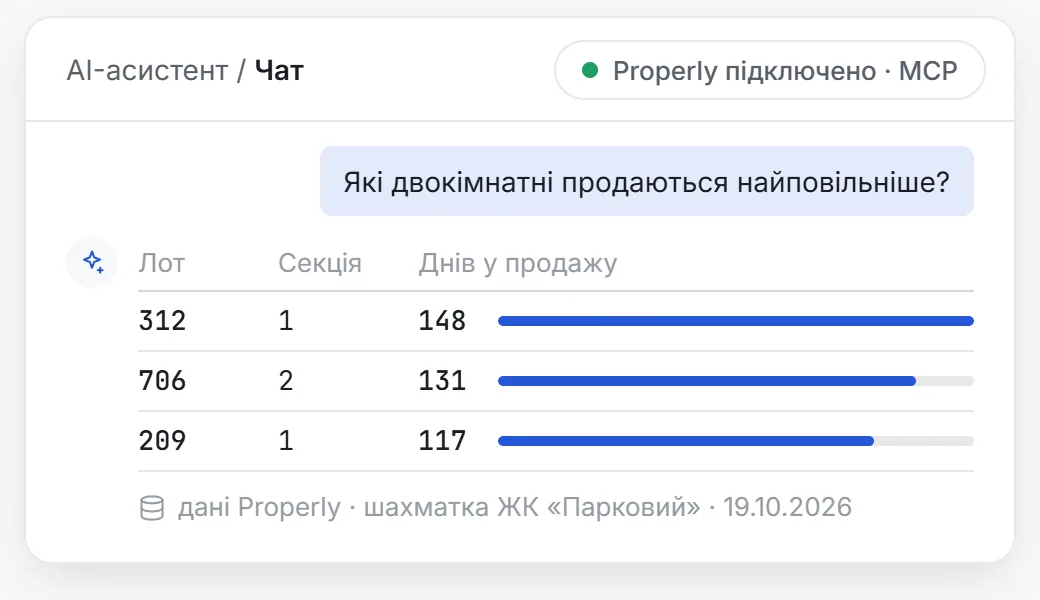
Which two-bedroom units are selling slowest?
Three 2-beds have been on sale the longest: • unit 312, section 1 — 148 days • unit 706, section 2 — 131 days • unit 209, section 1 — 117 days I can show them on the unit grid or draft a pricing rule.
Ask the assistant
Properly data · Parkovyi · 21 Oct 2026
AI assistant chat with a table answer built from Properly data

01 · Connect AI

Your AI + Properly

  • connect the models and AI services your company has chosen
  • MCP is an open standard: your company's AI assistant sees Properly data and answers in plain language
Deal card with an “AI summary” block and the next step

02 · Agents for the team

Manager's assistant

  • a summary of the client card before a call
  • needs from the conversation go into the card on their own
  • draft replies and a suggested next step
A chat agent on the developer's website picks an apartment and hands the lead to a manager

03 · Agents for buyers

24/7 chat agent

  • answers questions about units, prices and terms on your website and in messengers
  • qualifies the buyer
  • passes the lead to the CRM

06Implementation

We launch it around your process

Five steps from the first meeting to your whole team working in Properly.

  1. 01

    Sales process audit

    We look at how your commercial team works and what is worth changing.

  2. 02

    Setup for your company

    Pipelines, fields, documents, roles, reports: done properly.

  3. 03

    Data migration

    Clients, deals, units and contracts from your spreadsheets and systems.

  4. 04

    Team training

    Marketing, sales, after-sales and managers, each in their own role.

  5. 05

    Support and development

    Updates from our research and improvements on request.

Methodology included. Processes, stages and reports are set up following M4U best practice, so you don't start from a blank page.

07Done properly

Don't bend your business to fit an IT system. Fit the system to your business.

We set up every deployment personally for your company, taking all its specifics into account, down to the smallest detail.

Configuration

Your process

processes and pipelinesfields and card layoutroles and accessdocument templatespricing rulesreportslanguages and currenciescustom work for your process

Deployment

Just for you

  • a separate deployment for your company
  • your own server, hosted where you choose, e.g. DigitalOcean

properly · your companyno other clients here

Security

Your data is yours alone

  • data isolated from other companies
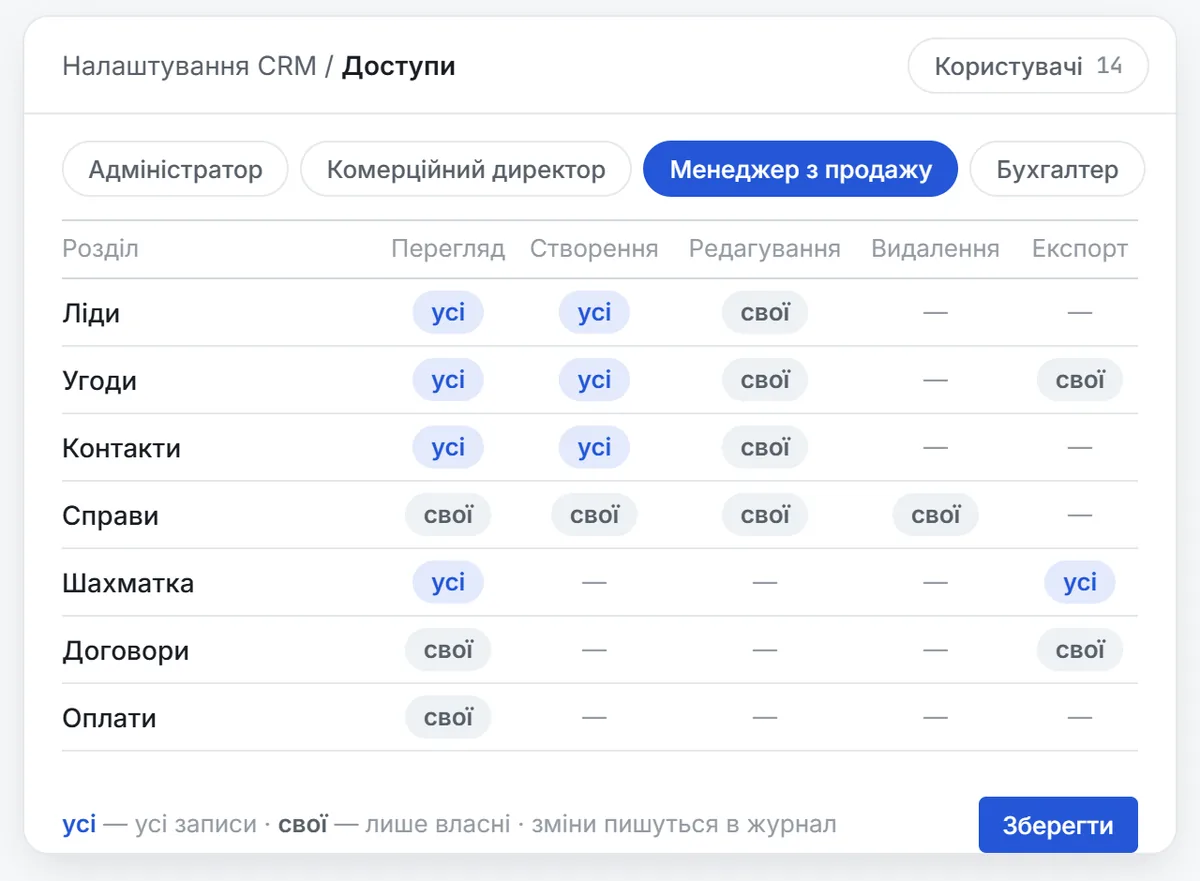
  • access down to “own · team · all”
  • change log
CRM settings: access matrix by role

development and support by technology partner FreshTech

08Room to grow

Room to grow, without limits

Properly can grow into an ERP. Together with project management and finance experts, we build exactly the ERP your business needs.

todaydevelopment on request

  1. Your request — what else the system should do
  2. Experts — describe the process following best practice
  3. The Properly and FreshTech team — builds the module in your system

09Who's behind it

Software from people who know how to sell real estate

Practice and technology in one team.

Practice

M4U

20 years in real estate

60+projects in 7 countries

Commercial project management, Maxify, P/ARC: experience proven by the market.

Technology

FreshTech

19 years in software development

350+ · 160+projects · clients worldwide

Technology partner: development, deployment and support of Properly.

See Properly
in action

We'll show you the system on the example of your project